Xcode Plugins Worth Installing: ColorSense and CodePilot
/ 2 min read
Table of Contents

Most iOS developers still use Xcode as the main tool.
Anyone who has used it knows it is full of mysterious problems:
Xcode WTF http://xcodewtf.tumblr.com/ Text from Xcode http://www.textfromxcode.com/
* @wtfxcode https://twitter.com/wtfxcode
Xcode really needs to ship an API for plugins. There is plenty of demand, and officially there is still not much of a response.
There is always someone better. A few people built plugins that are actually useful. That is what this post is about.
First: ColorSense
What it does
In Objective-C we use UIColor all the time. Asking a visual designer for the value, or hunting down the RGBA yourself, gets old. With this plugin, a normal UIColor expression (for example [UIColor redColor]) shows a color chip. Click it and the Mac OS X color panel opens. Very convenient.
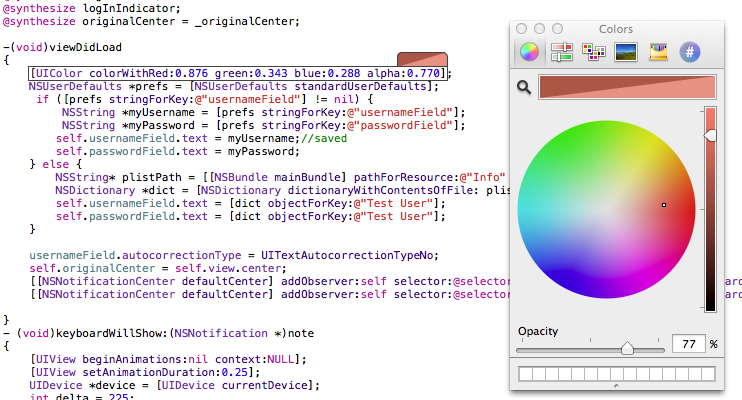
That screenshot is from my own screen. As a web developer I also installed Hex Color Picker, so the color panel can give me a hex value too.
Install
- Clone the official git repo
- Open the ColorSense project in Xcode
- Build the ColorSense project
- Restart Xcode
Done.
Official repo
https://github.com/omz/ColorSense-for-Xcode
Second: CodePilot
What it does
Xcode has its own way of managing files. It does not follow the real folders. It uses groups, so the project looks tidy inside the IDE. Once a project grows, or you pull in a pile of libraries, you still lose files. I kept wishing Xcode had a fast file finder like Sublime Text 2 or Alfred. That is how I found CodePilot.

Screenshot above.
Install
- Unzip the download
- Put
CodePilot2.xcpluginin~/Library/Developer/Xcode/Third-Party Plug-ins(I was on Xcode 4.5.1 from the App Store) - Restart Xcode
The shortcut is Shift + Command + X (
 X)
X)
Much easier to find things, right?
Official site
http://codepilot.cc/